
Final Cut Pro for iPad has been updated to version 3.4, bringing elements of Apple’s Liquid Glass design language and improved support for the iPhone 18 Pro’s camera features.

Liquid Glass Goes Pro
I’m a little embarrassed to say that I hadn’t noticed that Final Cut Pro didn’t implement Liquid Glass until now. The interface has largely remained the same since its launch on iPad in 2023, so part of me thought this was just what the app would always look like.
In Apple’s documentation they call this update a “redesign,” which feels like a bit of a stretch to me, but after going through the app for this article, there are a lot of visual changes throughout the app.
The two common changes you’ll see across the interface are:
- Liquid Glass
- An overall more rounded UI
Projects Screen
The iPadOS 18-style large header has been removed, freeing up more space for the project list.


The overflow button (…), New Project button, and toolbar buttons are now (coated? Covered? Encased?) in Liquid Glass.
The edit button moves from the bottom center of the screen to the bottom right of the video preview.
The previous interface also had a separate sidebar you could toggle to manage your subscription and payment details. This has been folded into the App Settings menu (Overflow button > Settings)

Editor Screen
The window controls move from the menu bar to the title bar itself. All of the title bar buttons get the Liquid Glass treatment as well.

The font size and padding in the effects browser have been adjusted, and the UI is more rounded.


The most interesting change in the editor is the removal of the bottom bar, in favor of a couple of Liquid Glass button platters for the controls that used to live there.

This gives your magnetic timeline a little more breathing room, though something about this part of the design feels a bit… off to me. I think it’s because I enjoy Liquid Glass elements more when there’s something colorful behind them. The Final Cut Pro UI is kind of dark and muted because pros hate fun.
Maybe I’ll get used to it, but this makes me wish that Final Cut had a light mode option.
Live Drawing
Some of the video details (resolution, length, frame rate) have been removed, but they didn’t really add anything to this screen. As in other places, the Done button is replaced with a checkmark button.

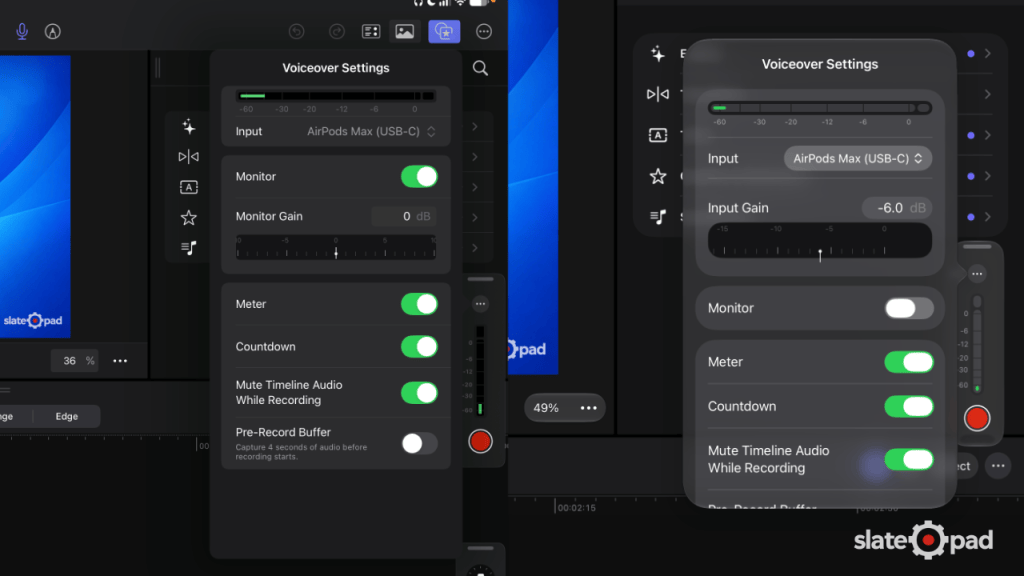
Voiceover Controls
The recording UI is now slightly transparent and more rounded. The Done button now becomes a checkmark.

Live Multicam
Each camera frame is more rounded, and the top and bottom bars are removed, though their physical space seems to be retained. The Add Angles button and Recording settings popovers gain slight transparency. Add Angles also gets a new icon.


Keyboard Shortcuts
For you keyboard warriors, this release adds a few new keyboard shortcuts:
- Add Basic Title: Control-T
- Add Basic Lower Third: Control-Shift-T
- Copy Effects: Option-Command-C
- Paste Effects: Option-Command-V
- Copy Keyframes: Option-Shift-C
- Cut Keyframes: Option-Shift-X
- Paste Keyframes: Option-Shift-V
- Play Rate 0.5: Option-L
- Play Rate -0.5: Option-J
- Delete Project: Command-Delete
- Duplicate Project: Command-D
iPhone 18 Pro Compatibility
Final Cut Pro can now apply Cinematic mode effects from video shot on iPhone 18 Pro or iPhone Duo using Final Cut Camera. As someone who would prefer to use Final Cut Camera for recording, but uses a lot of Cinematic mode, this is a godsend (or at least it will be when I get my iPhone Duo).
Bug Fixes
Per Apple’s release notes, this update includes the following bug fixes:
- Fixes an issue that caused undo and redo to be cleared after using Montage Maker.
- Addresses an issue that prevented the Go to Range Start/End keyboard shortcuts from updating the timecode for media browser clips.
- Improves reliability and accuracy when switching multicam angles.
- Resolves an issue that prevented Final Cut Pro for iPad from controlling a Final Cut Camera angle after it reconnected in a Live Multicam session.
- Fixes an issue that caused audio fade timing to unexpectedly change while modifying multiple clips with different audio fade timings.
- Addresses an issue that caused the microphone permission prompt to not appear when microphone access was disabled in Settings.
- Resolves an issue that caused the keyboard to unexpectedly disappear while using Voice Control to search in the media browser.
- Improves Voice Control accessibility support for navigating and browsing the content browser.
- Improves the VoiceOver accessibility description for the Project Menu button.
- Improves Larger Text and Bold Text accessibility support in the voiceover feature.
- Includes stability and performance improvements.
Leave a Reply