

The iPad has always been a great device for touch gaming. Arguably better than using a phone since your hands aren’t obstructing as much of the display, and you have a larger surface to grip onto.
But touch controls aren’t great for some of the Triple-A console game ports we’ve seen come to iPadOS over the past few years, like Death Stranding, Red Dead Redemption, and more recently, Control: Ultimate Edition. This class of game is designed with a hardware game controller in mind.
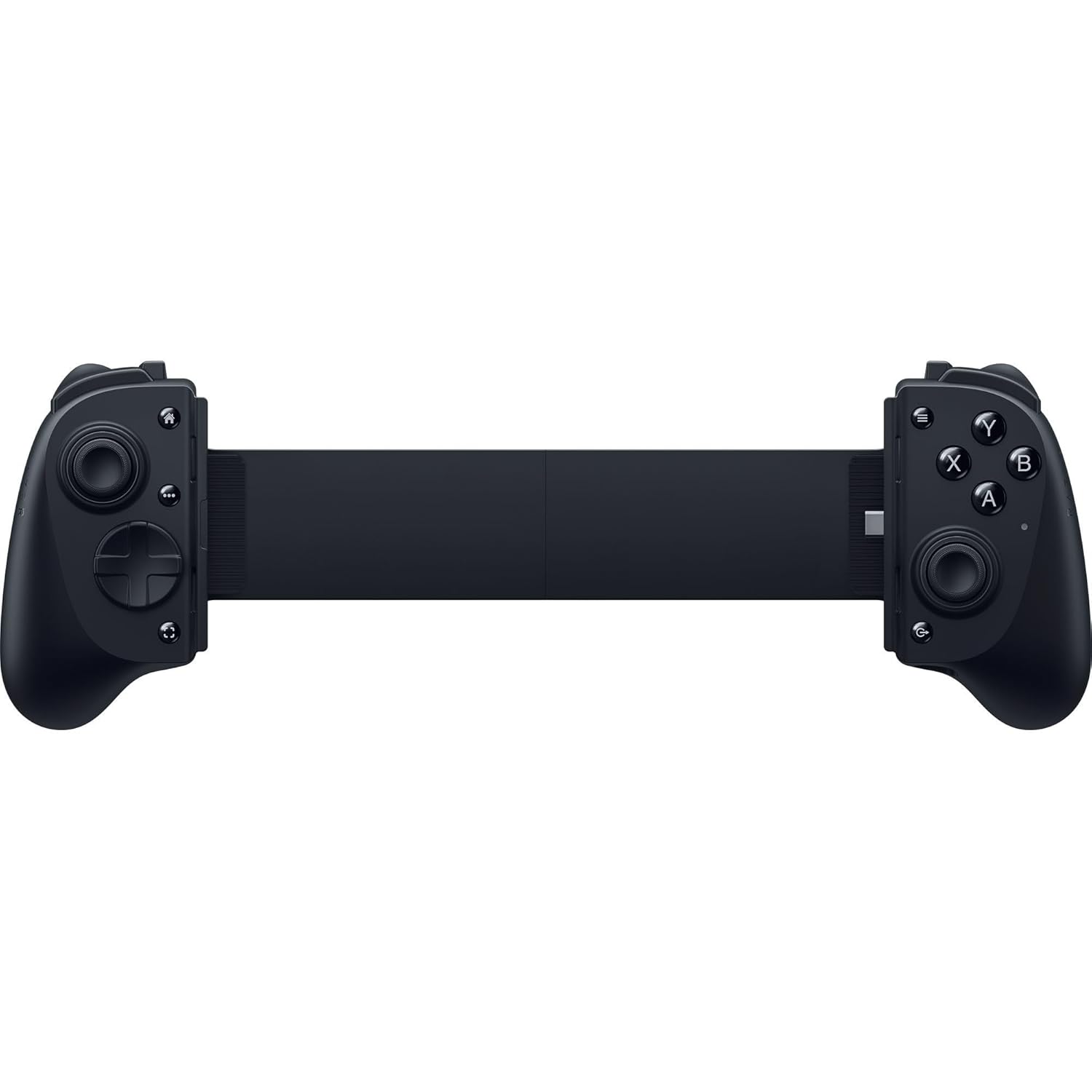
Which brings me to an accessory I picked up a few months ago called the Razer Kishi V3 Pro XL, which is a grip style game controller for tablets. While it’s not without its faults, especially the price, this controller has moved the iPad Pro from an occasional gaming device to something that’s part of my regular gaming rotation.
| Pros | Cons |
|---|---|
TMR thumbsticks eliminate stick drift | $200 price tag |
| Passthrough USB-C charging port & 3.5mm headphone jack | No haptic feedback on iPadOS |
| Seamless iPadOS Gaming integration | D-pad is loud |
The Razer Kishi Hardware

The grip itself works with mid-size and larger iPads and Android tablets (10 to 13-inches) with a USB-C port. Even though the grip works with 13-inch iPads, the 11-inch size is really what’s more comfortable with this controller.
The Kishi has two TMR thumbsticks in the off-center Xbox style layout. Using TMR technology offers a couple of big benefits over Hall-Effect thumbsticks or potentiometer thumbsticks, like the ones on the PS5 DualSense or Nintendo Switch Joy-Con. They offer a higher resolution polling rate, making them able to register more minute movements, which means in something like a competitive first-person shooter, these thumbsticks will register more of your subtle stick movements.
Like Hall-Effect sticks, TMR thumbsticks also use electromagnetic sensors to essentially remove the stick-drift problem that standard controllers can develop over time.
As far as the D-pad goes, it’s “fine”. I don’t love it. It’s a little loud and a little too clicky for my taste. I’ve mostly been using the analog sticks, so it hasn’t been a huge problem. When playing retro games using the Delta emulator app, the D-pad was accurate and responsive enough that I was able to handle the precise platforming of Super Mario Bros. 3 without issue.
The controller also has a load of other buttons. We have the standard ABXY face buttons, which I don’t have any complaints about. There are three buttons on the top of each grip: a shoulder button, a trigger, and a third button.
Around the back, there are an additional two buttons for those of you that like programmable back buttons.
At the bottom of the right grip, there’s a USB port with passthrough charging for keeping your iPad charged while you’re gaming, which you will absolutely need for more intensive games. There’s also a 3.5mm headphone jack for those that prefer wired audio.

There are five additional buttons on the front:
- The Home button launches the Gaming Overlay that’s built into iPadOS, which lets you get to your Game Center achievements, quickly connect with contacts you want to game with, and even adjust some system-level settings like screen brightness and volume.
- Two buttons that work like Start and Select, or View and Menu on other controllers.
- A button that looks like a screenshot button but actually triggers a screen recording session when held down.
- A dedicated button for launching Razer’s Nexus Game Launcher.
The controller itself is a tad on the bulky side, but I’m not sure how you’d make this style of controller much thinner without it starting to feel cheap. The Kishi doesn’t fit in my smaller iPad EDC bag, but works fine in a standard size backpack.
One area where Android users win out over iPad users is with haptics. Haptic feedback is only supported on devices running Android 12 or newer, for whatever reason. Hopefully that can change in the future with future iPadOS updates.
Nexus Launcher

Razer ships its own dedicated launcher app for the Kishi called Razer Nexus. Similar to the Apple Games app, it serves as a dashboard for getting into your games and provides a curated list of game suggestions.
More crucially, the Nexus app is where you map the remappable buttons and apply firmware updates. While I didn’t have a ton of use for the app myself, I didn’t find it offensive or poorly made.
The Experience of Actually Gaming on iPad With a Handheld Controller

The past few years, we’ve seen some triple-A console ports coming to iPadOS, and I can’t think of a better way to play them than with this style of controller, especially since external display support for games on the platform is almost non-existent.
Games like Control: Ultimate Edition or Tomb Raider feel incredibly natural to play this way. In the past, I’ve tried using a stand and a Bluetooth controller, but the experience doesn’t really compare. I’m about 10 hours into Control on my iPad Pro, and I don’t think I’ve ever put anywhere near that amount of time playing a game on my iPad. It’s really easy to just put my iPad in the grip and almost forget I’m gaming on an iPad.
That being said, even though iPads are pretty light, especially the iPad Pro, the combination of the tablet and the controller is heavier than pretty much any gaming handheld. I wouldn’t go as far as calling it “heavy”, but it has more heft than some people might like. For longer sessions, I was able to just rest the iPad on my stomach and, because of the iPad’s aspect ratio, it was still pretty comfortable to play this way.
I really appreciated the passthrough USB port, because if you’re going to use your iPad like a gaming handheld, there’s a good chance you’re going to get battery life like a gaming handheld. I found that when playing Control on my iPad Pro, I was getting maybe a couple of hours of play before noticing I was in the mid-to-low 20 percent battery range. Of course, I did have the graphics options cranked up, which will negatively impact battery life. Now I mostly play that game plugged in.
The way this controller integrates with the Gaming Overlay in iPadOS really sells the “illusion” of the iPad as a gaming handheld. It’s a small thing, but I like that if I’m playing at night before bed and want to adjust the brightness, I can quickly trigger the overlay with the Home button on the controller and change the brightness without ever taking my hands off the controller.

Really, the biggest functional issue I ran into with this controller on both iPadOS and Android is that sometimes, if you let the tablet go to sleep while still in the grip, the controller won’t be responsive when it wakes and you have to reconnect it. It’s a relatively minor problem, in my book.
Is It Worth It?
The other big negative is the price: the Razer Kishi V3 Pro XL is $200. For any controller, that’s pretty steep. Which raises the question, is the controller really worth it?
If you’re someone that already owns an iPad and wants to game more on it, then yes, I’d argue it is. $200 is expensive for an accessory by itself, but if it’s enabling you to take better advantage of the hardware you already own, there’s some value there. And it’s cheaper than buying most other handhelds, like the Steam Deck.
For an occasional iPad gamer, you’re probably going to be better off saving yourself some money and pairing a standalone controller with some kind of stand to prop up your iPad.
Conclusion

I’ve never been much of a gamer on Apple devices, but the iPad Pro hardware is so good it seems like a shame to not play some games on it. The combination of the recent console ports and Razer Kishi V3 Pro XL has moved the iPad into my regular rotation of gaming devices, alongside the Nintendo Switch 2 and the PS5.
Products mentioned in this review
Products below were referenced or used during testing for this review. Some links may be affiliate links, meaning SlatePad may earn a commission at no extra cost to you.
Leave a Reply