
After the M5 iPad Pro came out in October of 2025, I decided to try something of an experiment. Since I’d bought a cellular model, and I generally prefer to use my iPad for everything I can, I wanted to see how far I could go using a tablet as my daily driver.

Turns out, it works pretty well, to the point that most days, my iPhone Air never leaves its charger.
Tablets aren’t pocketable devices, though, so I had to add a bag to my everyday carry. In this post, I want to go over what a tech EDC bag looks like for someone using an iPad as a daily driver.
The Bag

I’m always kind of on the lookout for a smallish shoulder bag or crossbody bag for my iPad Pro, and I’ve settled on the Tomtoc 5L Compact Sling Backpack. This is the extra-small size, and when I bought it, it was on sale for around $40.
The reasons I went with this are:
- Mostly price
- It doesn’t stand out too terribly much, which is important to me, because I’m not trying to make a statement or call attention to myself
- It’s comfortable to wear when out and about
- It has a decent amount of pockets
The iPad

The device this setup is built around is the M5 11-inch iPad Pro in Space Black, with 512GB of storage, 12GB of RAM, and an active cellular plan.
With cellular and a healthy amount of storage, I can use my iPad for things like music, podcasts, GPS navigation, and workout tracking, pretty much all the things I use my phone for on a day-to-day basis.
There are a few reasons I prefer this setup to just bringing my phone with me:
- The thin and light design. The iPad Pro packs laptop-level power into the thinnest device Apple has ever made, all in under a pound, and small enough to go with me almost anywhere.
- iPadOS 26. iPhone apps in iPadOS 26 run in floating windows if you’re using Windowed Apps mode or Stage Manager, so I can easily have multiple iPhone apps open at once, which increases my productivity.
- The keyboard option. If I need to, I can attach this thing to a keyboard for something more typing-intensive. It’s great for going to a coffee shop and working on a script or blog post. You can technically do that on your phone, but it’s a terrible experience. The iPad’s versatility really shines here. It’s enough of a phone and enough of a laptop that it can stand in for both.
Honestly, it feels like I’m already getting all the benefits of that rumored folding iPhone.
Reducing Distractions
An unexpected benefit of moving to the iPad as a daily driver is actually the things it can’t do.
It doesn’t fit in my pocket, for one. That means there’s a little bit of additional friction every time I pull the iPad out of my bag to use it. So I’m much less likely to be doom-scrolling while waiting in line somewhere, or getting lost in YouTube when I sit down for a meal. If I want to check something, I have to consciously decide it’s worth digging the iPad out, waking it up, using it. That’s usually enough friction for me to keep it in the bag.
If I go out to eat with a friend, my iPad has a roughly 99% chance of staying in my bag, preventing me from mindlessly checking email or scrolling while others are talking, and keeping me fully present in the moment.
Apple Watch Series 10

I’ve been using the Apple Watch Series 10 since it came out, and it’s the first Apple Watch where I honestly feel like nothing is missing. There’s no FOMO here, it’s doing everything I need it to do as a fitness tracker and, more relevant to this setup, a decent phone stand-in.
Since I have a cellular model, it can make and receive cellular calls when I’m away from home. I’ll readily admit this only works because I don’t get a lot of phone calls, personally or professionally.
Slight tangent: when I first went down this road, my iPad was actually receiving cellular calls over the cell network, not directly, of course, since a cellular iPad is only provisioned for data, but the calls were more or less getting routed to my iPad the same way they do with an Apple Watch.
After about a month, that randomly stopped working, and both Apple and Verizon support think I’m crazy when I call to try to get it working again. Maybe it was a fluke, I don’t know, but for now, the Apple Watch keeps its job as a pseudo-phone.
The Magic Keyboard
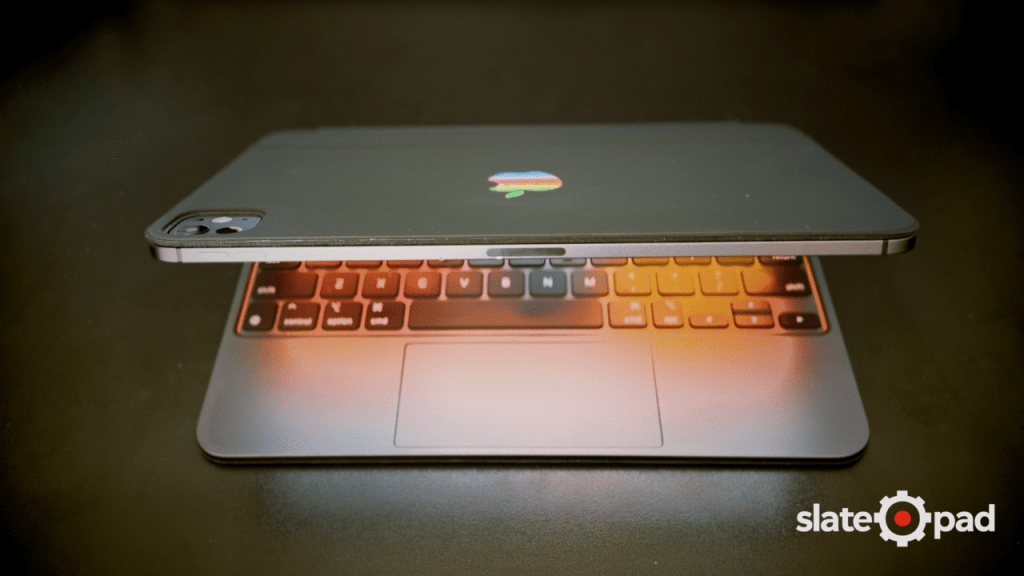
Next is the Magic Keyboard. I don’t think I need to say much about it, you know what it is, what it does, and yes, it’s still very expensive. I do think the black keyboard with the black iPad looks pretty damn slick, though.
One thing I will point out: the iPad does not live in the Magic Keyboard case in my bag. You’d think that would make sense, since it could also protect the iPad while I’m carrying it around, but it gets in the way of using the iPad as a tablet. I bought an iPad Pro instead of a MacBook Air because I wanted to use a tablet.
So the Magic Keyboard comes along in case I need it, but between touch, voice, and stylus input, I generally don’t.
Apple Pencil Pro

Speaking of stylus input, the Apple Pencil Pro comes with me everywhere. This bag is small enough that when the Pencil inevitably falls off, I don’t have to search too far to find it.
I never know when I might have a few minutes of downtime to work on a thumbnail or edit some photos, and the Apple Pencil Pro is probably the best tool for that.
I use the Pencil as a way to slow down, which I know is kind of the opposite of the messaging we get everywhere else, be faster, be more productive, go, go, go. But when I really want to slow down and be more thoughtful while planning, I’ll use the Scribble feature in iPadOS to write everything instead of typing.
Power

When I need to plug in, and if you’re using your iPad this heavily, you will need to plug in, I have the Anker 733 2-in-1 Power Bank, which is apparently no longer being produced (a good alternative is the Anker Nano 3-in-1 Portable iPhone Charger). This is one of those wall chargers that’s also a power bank.
It provides 65W when plugged into the wall, and 30W when used as a standalone power bank.
To be honest, it’s part of this EDC because it’s something I had lying around. I don’t even remember buying it, but I do like the idea of a charger that can provide backup power in the event of an unexpected outage.
As for the cable, it’s just a random Anker cable I bought years ago that supports fast charging.
Earphones

My primary earphones are the AirPods Pro 3. Nothing says “leave me alone and don’t talk to me” like having a pair of earbuds in at all times. The noise cancellation is top notch, so I can focus when I’m writing, but most of the time I just keep these in Adaptive Transparency mode.
The connection to the iPad Pro isn’t always as seamless as it could be, they seem to want to connect to the iPhone and Apple Watch first before falling back to the iPad. Most of the time it’s fine. I just make sure they’re connected before I put the iPad back in the bag.
Lock & PowerBeats Pro 2

Since I bring my bag to my workouts, I carry a couple of gym-related items.
There’s a small combination lock in one of the inner pockets for my locker. I actually looked to see if there was a “smart” combination lock that would use something like Bluetooth or NFC to lock or unlock, but alas, such a thing did not appear to exist. Probably for the best.
In that same pocket, I keep a pair of PowerBeats Pro 2, used exclusively for the gym and other workouts. I don’t run as much as I used to, mostly because it’s boring, but I like the security of the ear-hook design when exercising. AirPods fall out of my ears when running, which is how I justify owning two pairs of earphones.
Keys & Wallet

In the back pocket are my keys and wallet. I do have the Apple FineWoven Wallet and it has absolutely seen better days, but it’s still doing the job. Its existence is a reminder that we still don’t have any form of MagSafe on the iPad, which kind of sucks.
Hot take: a worn FineWoven wallet looks way better than a worn leather wallet, which just looks dirty to me.
Conclusion
Being able to use an iPad as your daily driver isn’t for everyone, but it’s one of the things I love about the Apple ecosystem, the ability to mix and match devices in a way that works for you without losing out on too much. The friction of using an iPad instead of a phone had some benefits like less doom-scrolling, being more present, and a setup that still covers everything I actually need day to day.


Leave a Reply